Doorsanchar Nepalese Telecom News, Smart Phones, Tablets, Mobiles, Gadgets, ICT & Telecom issues, Nepal Telecom, Ncell, Teleosonera, STM Telecom Sanchar, Nepal Satellite Telecom, Hello Mobile, Internet in Nepal, Business on Telecom Sector in Nepal, Views, Blogs, ICT News, Views, Reviews from Nepal, Mobile Prices in Nepal, Buy a Mobile in Nepal, Comparative mobile prices, Smart Phone in Nepal, Buy a smart phone in Nepal, Nepal Cheapest Mobiles, Nepal Doorsanchar Company Limited, Nepal Telecom News, smart, NTC, Namaste, GPRS, ADSL, internet, DSL, IP, Gramin Telecom, Rural Telecom, iPhone, Apple in Nepal, Sewa Telecom, Reynolds Holdings, SMS, MMS, Free Phone, CDMA, internet in Nepal, Nepal Phone, Free Phone Nepal, Website hack, WWW, http://, Telecom Issues, Telecom Magazines, Huwai, ZTE, Samsung, Motorolla, Panasonic, Smart TV, configure ADSL, Subscribe internet, Cable, DSL, Internet Speed Test, Test My Net Speed, Online Cinema, Free Calling Card, Nepal Tech, Tech Nepal, Tech 2 Nepal, Travelling Nepal, News Nepal, Nepal News, ekantipur, onlinekhabar, nagariknews, mysansar, Camera, Tablet, LTE, Ultrabook, E Cards, FTP, Google, Cloud, Cloud computing, cloud service, Mac, Free software, software freedom, downloads, download free software, Nepal software, play, google play, android apps, applications, IOS, Apple, Facebook, google.com, facebook.com, social networking, domain, free domain, Nepal Website, Website making, website design, free calling cards, chat, Nepal Chat, Nepalese websites, Traveller sites in Nepal, Wallpapers, Nepalese wallpapers, New Walpapers, The Pirates bay, download software, Free website making, eticketing, eservice, egovernance in Nepal, egov, Nepal electronics good, Mobile Expo in Nepal, Mobile Market, Nepal Mobile Price, Nepal Tech News, Nepal Telecom News, Nepal Doorsanchar News, All telecom News, Tech News, Living with ICT and Telecom, Lifestyle, Ebooks, ereadings, elibrary, free books online, free software online, online media

Do you remember the last time you wrote something on paper with an actual pen? Neither do we. Writing is replaced by typing and paper is replaced by computers or smartphones. Likewise, taking notes has evolved even more. It’s enough to snap a photo with your camera and there you go – all important information saved easily and quickly on your iPhone. That’s great, but can you reuse and edit that data if needed ? Usually not, except in the scenario where it is rewritten manually, but that’s really exhausting.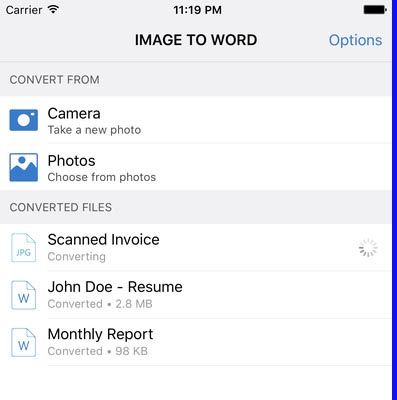
Fortunately, like everything else, even that area has evolved. Nowadays, there are apps which can help you efficiently convert images to Word or Excel, the most commonly used file formats. In that way, they can very simply be edited and modified. So, let’s meet these life savers.
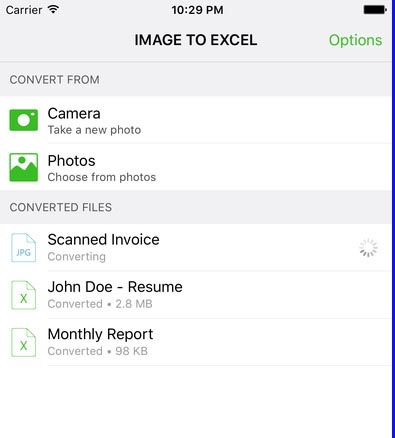
Image to Word and Image to Excel are free apps for your iPhone that will save you from squandering your time and spare your energy needed for retyping the whole notes, tables, invoices, lists and other documents. Some of these apps’ characteristics are:
- First-rate conversion quality and perfect recognition
- Screenshots and complex tables can be converted too
- No limits on the number and size of converted files
- Converted files are easily opened in other apps
- Won’t drain battery or resources
 Besides, they are very intuitive and therefore easily manageable. Just follow these straightforward instructions and get your photos converted.
- After downloading the apps, select from where you would like to convert your image: take a new photo with your camera or choose an existing photo
- Tap on the image that will later appear among converted files
- Open your converted document in an editing app, such as MS Word or Excel and make some changes
Also, within the apps you’ll find useful advice how to get the most out of your photos and convert them in the best way. So keep on snapping photos and bring taking notes to a whole new level!